
The Properties Window
The Properties window lets you view and edit the property values for the current template. It works like the property sheet you see when you execute a template from Template Explorer.
To open the Properties window, press F4 or select View > Properties Window.
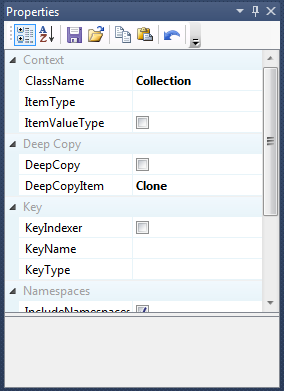
Before you can generate code, you must supply values for all of the template's required properties. To learn how to enter values, see Setting properties.
Property persistence
Generator can remember the property values you set for each template. The values are kept from one session to the next, including when you change or recompile the template, or close and reopen Generator.
To turn this on or off, use the Enable Property Persistence setting in the Options dialog.
Property sheet toolbar
| Button | Name | What it does |
|---|---|---|
 |
Categorized | Groups the properties by category. This is the default. |
 |
Alphabetical | Sorts the properties alphabetically by name, in a single list. |
 |
Save Property Set | Opens a Save As dialog so you can save the property values as a Generator project file. |
 |
Open Property Set | Opens an existing Generator project file and loads its values into the property sheet. |
 |
Copy Property Set | Copies the property values to the Windows clipboard as Generator project XML. You can use project files as input to the console application. |
 |
Paste Property Set | Restores the property values from Generator project XML on the clipboard, such as XML you copied with Copy Property Set. |
 |
Refresh Property Values | Refreshes the property values and clears cached values, such as cached database schema information. |
 |
Reset Properties to Default | Resets the properties to their default values. |
 |
Filter | Shows only the properties whose names contain the text you type. For example, type a to show the properties that contain the letter "a". |
Tip
If a template is using out-of-date database schema information, click Refresh Property Values to clear the cached schema.