
Using SchemaExplorer
SchemaExplorer is CodeSmith Generator's built-in library for working with database metadata. You can use its classes interactively, programmatically or, most often, both. For example, you can let the user pick a database and then list all of its tables in code:
<%@ CodeTemplate Language="C#" TargetLanguage="Text" Description="List all database tables" %>
<%@ Property Name="SourceDatabase" Type="SchemaExplorer.DatabaseSchema" Category="Context" Description="Database containing the tables." %>
<%@ Assembly Name="SchemaExplorer" %>
<%@ Import Namespace="SchemaExplorer" %>
Tables in database "<%= SourceDatabase %>":
<% for (int i = 0; i < SourceDatabase.Tables.Count; i++) { %>
        <%= SourceDatabase.Tables[i].Name %>
<% } %>
Choosing a database
Before you can run this template, you must give the SourceDatabase property a value. When you select the property in the property grid, Generator shows a builder button (...), which means an editor is available for the property. Generator uses the editors built into SchemaExplorer automatically:
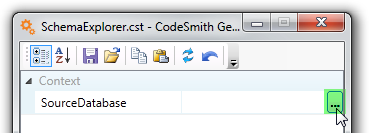
Click the builder button to open the Database Picker. The Data Source list shows the data sources you've defined on your computer, and its builder button lets you manage them:
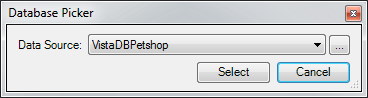
That button opens the Data Source Manager, which lists each data source and its provider type. You can copy, add, edit or remove data sources here:
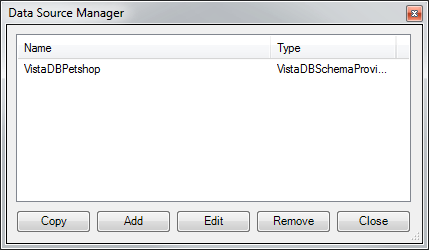
When you add a data source, the Data Source dialog asks for a name, a provider type and a connection string:
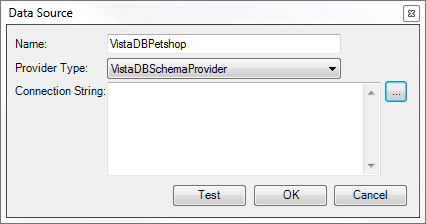
For more about managing data sources, see Schema Explorer.
Database providers
Generator includes schema providers for many databases, including:
ADOXSchemaProviderISeriesSchemaProviderMySQLSchemaProviderOracleSchemaProviderPostgreSQLSchemaProviderSQLAnywhereSchemaProviderSqlCompactSchemaProviderSQLiteSchemaProviderSqlSchemaProviderVistaDBSchemaProvider
To connect to another kind of data source, you can build a custom schema provider.
The output
With the SQL Server Northwind sample database, the template produces:
Tables in database "Northwind":
    Orders
    ComponentTypes
    Products
    Order Details
    CustomerCustomerDemo
    CustomerDemographics
    Region
    Territories
    EmployeeTerritories
    Employees
    Categories
    Customers
    Shippers
    Suppliers
Once the user picks SourceDatabase, Generator can use it as the root of an object model of the entire database. You can also watch the Schema Explorer video.
In this section
| Page | What you learn |
|---|---|
| The SchemaExplorer object model | How databases, tables, views, commands and their children fit together. |
| Choosing objects | Let users pick tables, views, commands or columns, including SQL functions. |
| Sorting collections | Sort SchemaExplorer collections by name. |
| Using extended properties | Read and add extended properties such as identity and default values. |
Note
For every class and member in the SchemaExplorer library, see the CodeSmith Generator API reference.