
Active vs. Passive Generation
Broadly speaking, there are two kinds of code generators: passive and active.
Passive code generators generate code once and then give up all responsibility for it. The wizards and scaffolding tools in IDEs are typically passive code generators. They're good for producing code that you then customize, but once the code exists, a passive generator can't regenerate it with changes.
Active code generators keep a link with the code they generate, so you can run them again and again over the same code. With an active code generator, the template is the source code. Suppose you generate 500 classes from a single template and then find a bug in how they handle persistence. You fix the one template and regenerate the 500 classes, instead of fixing the same bug 500 times.
But what if a template can't generate everything a file needs? Some of those 500 classes might need custom methods that differ from class to class. For active generation to work, you need a way to customize the output and still regenerate it without destroying your changes.
By default, CodeSmith Generator overwrites an existing output file completely. There are three ways to combine regenerated code with your own code:
| Approach | How it works | Best for |
|---|---|---|
| Partial classes | Generated and hand-written parts of a class live in separate files. | C# and Visual Basic classes. |
| Inheritance | Generate a base class and customize a derived class. | Any object-oriented language. |
| Merge strategies | Generator merges its output into the existing file. | Files that must mix both kinds of code, in any language. |
Use partial classes
C# and Visual Basic let you split a class across several declarations, in one or more files. At compile time, the compiler finds all the parts and combines them into a single class. This is the simplest way to enable active generation: generate one part of the class, and keep your own code in another file that Generator never touches.
In C#, partial class definitions look like this:
partial class Class1
{
    public void Method1()
    {
        // code to implement Method1
    }
}

partial class Class1
{
    public void Method2()
    {
        // code to implement Method2
    }
}
In Visual Basic, the same example looks like this:
Partial Public Class Class1
    Public Sub Method1
        ' Code to implement Method1
    End Sub
End Class

Partial Public Class Class1
    Public Sub Method2
        ' Code to implement Method2
    End Sub
End Class
Generate the file with Method1, and keep the hand-written Method2 in a separate file. When you build, the compiler joins the two into one class.
For details, see partial classes in C# and the Partial keyword in Visual Basic.
Use inheritance
Another way is to generate a base class and customize a derived class. When you regenerate the base class, Generator doesn't touch the code in the derived class.
For example, you might use this template in a financial application:
<%@ CodeTemplate Language="C#" TargetLanguage="C#" Description="Base class generator." %>
<%@ Property Name="ClassName" Type="System.String" Description="Name of the class." %>
<%@ Property Name="ConstructorParameterName" Type="System.String" Description="Constructor parameter name." %>
<%@ Property Name="ConstructorParameterType" Type="System.String" Description="Data type of the constructor parameter." %>
class <%= ClassName %>
{
    <%= ConstructorParameterType %> m_<%= ConstructorParameterName %>;

    public <%= ClassName %>(<%= ConstructorParameterType %> <%= ConstructorParameterName %>)
    {
        m_<%= ConstructorParameterName %> = <%= ConstructorParameterName %>;
    }
}
You run it with these property values:
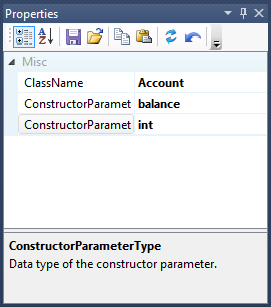
The generated class looks like this:
class Account
{
    int m_balance;

    public Account(int balance)
    {
        m_balance = balance;
    }
}
With the generated code in Account.cs, you write a second class by hand and save it in Checking.cs:
class Checking : Account
{
    public Checking() : base(0)
    {
    }
}
Now suppose your requirements change, and the account balance should be a floating-point value. You set ConstructorParameterType to double, regenerate Account.cs and recompile, without touching the hand-written code in Checking.cs. As long as you don't put custom code in the base class, you can regenerate it as often as you like.
Use merge strategies
Merge strategies let Generator write specific parts of a file while you customize the rest. They're the most flexible option and work in any language, as long as everyone keeps custom code out of the parts that Generator overwrites.
For example, this template generates HTML pages with standard scaffolding around a body that the user writes:
<%@ CodeTemplate Language="C#" TargetLanguage="HTML" %>
<%@ Property Name="Title" Type="System.String" Optional="False" Category="Options" Description="Page title." %>
<%@ Property Name="CharSet" Type="System.String" Optional="False" Default="windows-1252" Category="Options" Description="Character set for the page." %>
<%@ Property Name="IncludeMeta" Type="System.Boolean" Default="True" Optional="False" Category="Options" Description="Include meta tags." %>
<%@ Property Name="Copyright" Type="System.String" Optional="False" Default="Copyright (c) MyCompany.com" Category="Options" Description="Copyright notice for the page." %>
<html>
<head>
<% if (IncludeMeta)
{ %>
<meta http-equiv="Content-Type" content="text/html; charset=<%= CharSet %>">
<% } %>
<title><%= Title %></title>
</head>
<body>
<h1><%= Title %></h1>
<!-- region Keep body -->
<!-- endregion -->
<p><%= Copyright %></p>
</body>
</html>
Generate the page with the PreserveRegions merge strategy and the initialization string RegionNameRegex=^[ \t]*(?i:Keep). As long as users limit their changes to the "Keep body" region, you can regenerate the meta tag, title and copyright notice as often as you like without destroying their changes. Generator recognizes HTML comment region markers like these out of the box, because the template's TargetLanguage is HTML.