Anatomy of a Project File
A CodeSmith Generator project file (.csp) is an XML file that stores the template property values for each of your outputs.
Every template has a property sheet that drives its metadata. When you save the property sheet, it's saved as a property set: an XML version of your properties and their values. This lets you get back all of the options you chose whenever you need them.
Header
The root codeSmith element contains the whole project and refers to the XML schema for Generator projects:
<?xml version="1.0"?>
<codeSmith xmlns="http://www.codesmithtools.com/schema/csp.xsd">
You can find csp.xsd in the Schemas folder of your Generator installation folder.
Defaults
Default template
Set a default template, and every property set that doesn't specify a template uses it.
<defaultTemplate path="businessobject.cst" />
Default properties
Default properties are available to every template in the project. They're useful for values that rarely change.
<defaultProperties>
  <property name="ClassNamespace">CompanyName.RootNamespace</property>
</defaultProperties>
Variables
Variables let you keep a shared value, such as a connection string, in one place and use it in any property set. To use a variable, write its name inside $(), for example $(ConnectionString1).
<variables>
  <add key="ConnectionString1" value="Data Source=(local);Initial Catalog=PetShop;Integrated Security=True" />
  <add key="ProviderType" value="SchemaExplorer.SqlSchemaProvider,SchemaExplorer.SqlSchemaProvider" />
</variables>

<propertySet name="Dbml" template="CSharp\Dbml.cst">
  <property name="SourceDatabase">
    <connectionString>$(ConnectionString1)</connectionString>
    <providerType>$(ProviderType)</providerType>
  </property>
</propertySet>
To learn how Generator creates and applies variables, see Project Options.
Property sets
Each output has a property set, which holds that output's property values. The values in one property set aren't shared with any other output. If a property set doesn't specify a template, it uses the default template.
<propertySets>
  <propertySet output="Product.cs">
    <property name="SourceTable">
      <connectionString>Data Source=.\SQLEXPRESS;AttachDbFilename=|DataDirectory|\Petshop.mdf;</connectionString>
      <providerType>SchemaExplorer.SqlSchemaProvider,SchemaExplorer.SqlSchemaProvider</providerType>
      <table>
        <owner>dbo</owner>
        <name>Product</name>
      </table>
    </property>
  </propertySet>

  <propertySet output="Order.cs">
    <property name="SourceTable">
      <connectionString>Data Source=.\SQLEXPRESS;AttachDbFilename=|DataDirectory|\Petshop.mdf;</connectionString>
      <providerType>SchemaExplorer.SqlSchemaProvider,SchemaExplorer.SqlSchemaProvider</providerType>
      <table>
        <owner>dbo</owner>
        <name>Orders</name>
      </table>
    </property>
  </propertySet>
</propertySets>
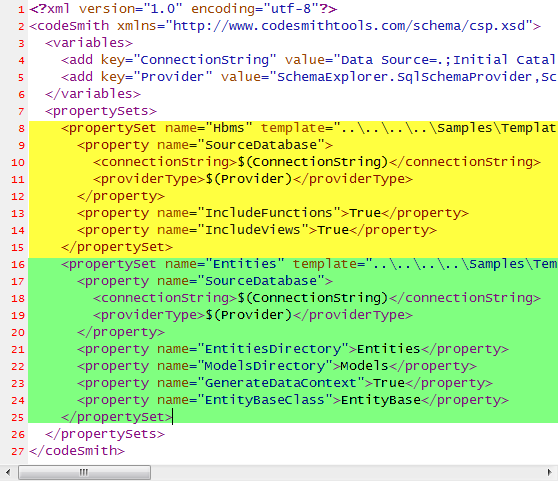
Each property set is a propertySet element, as highlighted in the project file below.