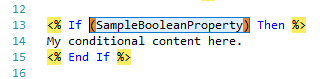
Bracket Highlighting
When the cursor is next to a parenthesis, square bracket or curly brace, the Template Editor highlights it and its matching partner.
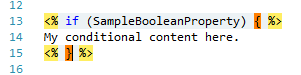
In the screenshot above, the cursor is next to a }, so both it and the matching { are highlighted. The highlight color in this example was changed to make it easier to see.
Moving and selecting between brackets
| Shortcut | What it does |
|---|---|
| Ctrl+] | Moves the cursor to the matching bracket. |
| Ctrl+Shift+] | Selects everything between the two brackets. |
Selecting between brackets is a quick way to replace the contents of a block.