
Generating from views and stored procedures
The CSLA templates can generate business objects from views and stored procedures, as well as tables.
-
Open the Edit Output dialog of
Entities.csp, as in the previous step: right-clickEntities.csp, select Manage Outputs, and double-click theEntities.cstoutput. -
Set the
IncludeFunctionsandIncludeViewsproperties toTrue. This turns on stored procedure and view support.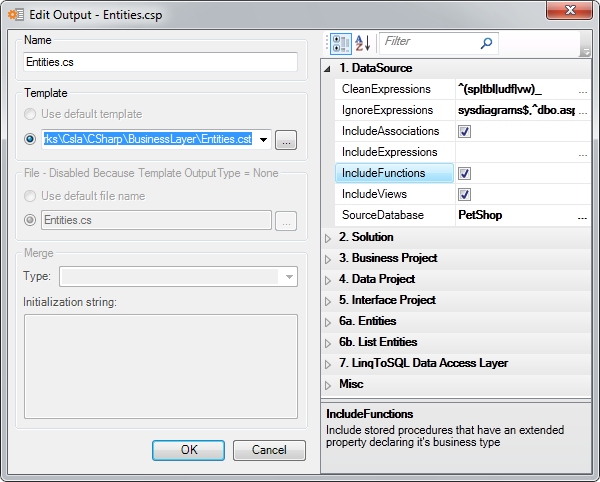
-
Click OK.
You can't choose views and stored procedures in the Edit Output dialog, so you set the business object type of a view or stored procedure with an extended property instead. Keeping the type out of the Entities output also means you don't have to reconfigure your outputs when you upgrade the templates.
Important
A business object is generated from a view or stored procedure only if it has one of the extended properties below.
Tip
You can quickly add an extended property in Schema Explorer.
Add one of these extended properties to the view or stored procedure. The name sets the business object type; the value is empty.
| Extended property name | Business object type |
|---|---|
DynamicRoot |
Dynamic root |
EditableChild |
Editable child |
EditableRoot |
Editable root |
ReadOnlyChild |
Read-only child |
ReadOnlyRoot |
Read-only root |
SwitchableObject |
Switchable object |
DynamicRootList |
Dynamic root list |
EditableRootList |
Editable root list |
DynamicListBase |
Dynamic list base |
EditableChildList |
Editable child list |
ReadOnlyList |
Read-only list |
ReadOnlyChildList |
Read-only child list |
NameValueList |
Name value list |
When you've added the extended property, regenerate, and the new business objects are added to the project.
For the other extended properties the templates use, see Using extended properties.
Next: Where to go from here.