
Declaring an enumerated property
Sometimes you want a property that limits the user to a fixed set of choices. For example, the Accessibility property of the SortedList.cst sample template controls the accessibility of the generated class, and the property grid shows the choices in a drop-down list:
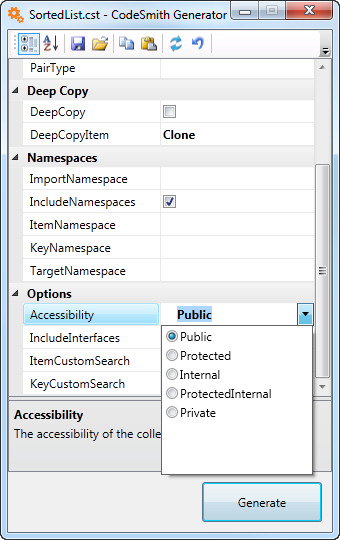
It takes two steps.
-
Define an enumeration in a
<script runat="template">block. In a Visual Basic template:<script runat="template"> Public Enum AccessibilityEnum [Public] [Protected] [Friend] [ProtectedFriend] [Private] End Enum </script> -
Use the enumeration as the type in the Property directive:
<%@ Property Name="Accessibility" Type="AccessibilityEnum" Category="Options" Description="The accessibility of the class to be generated." %>
The property grid then offers each member of the enumeration as a choice, and the template code reads the selected value from the Accessibility property.
Tip
To share an enumeration between templates, define it in a code-behind file instead of a script block.