
Customization and refactoring
Watch the Customization and Refactoring video on YouTube.
Unlike standard LINQ to SQL, PLINQO supports customizing and refactoring your dbml file.
Sync database changes
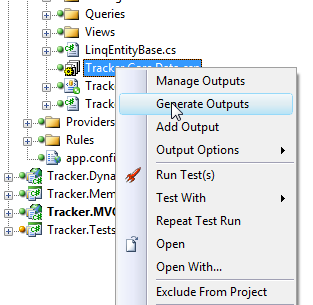
Change is part of every project. The LINQ to SQL designer in Visual Studio does a lot for you when you work with entities, but it doesn't make refactoring easy: to pick up a database change, you drop the entity and add it again. That also drops every change you made to the entity, so you make them all again. With PLINQO, change the database, right-click the Generator project file, and select Generate Outputs. PLINQO syncs the dbml file with the database and keeps your manual changes to the dbml file.
Metadata classes
PLINQO generates and maintains a metadata class inside each entity. The metadata class is where you add extra knowledge about your domain objects and their properties, using the attributes in System.ComponentModel.DataAnnotations. Each time you regenerate, PLINQO syncs the dbml and database changes and keeps your custom attributes, using the Generator InsertClass merge strategy. Maintaining the metadata on every entity is as simple as regenerating.
Here's the metadata class inside the User class:
[CodeSmith.Data.Audit.Audit]
private class Metadata
{
    // Only Attributes in the class will be preserved.

    public int Id { get; set; }

    [Required]
    public string UserName { get; set; }

    [Required]
    [DataType(System.ComponentModel.DataAnnotations.DataType.Password)]
    public string Password { get; set; }

    [DataType(System.ComponentModel.DataAnnotations.DataType.EmailAddress)]
    public string EmailAddress { get; set; }

    public string FirstName { get; set; }

    public string LastName { get; set; }

    public System.Data.Linq.Binary Avatar { get; set; }

    [Now(EntityState.New)]
    [CodeSmith.Data.Audit.NotAudited]
    public System.DateTime CreatedDate { get; set; }

    [Now(EntityState.Dirty)]
    [CodeSmith.Data.Audit.NotAudited]
    public System.DateTime ModifiedDate { get; set; }

    public System.Data.Linq.Binary RowVersion { get; set; }

    public EntitySet<Task> AssignedTaskList { get; set; }

    public EntitySet<Task> CreatedTaskList { get; set; }

    public EntitySet<UserRole> UserRoleList { get; set; }
}
Because the metadata class is already there, you know where to go when the model needs more information. ASP.NET Dynamic Data attributes, such as the control that displays the data, data types, field validation and actions taken on properties, are just some of the attributes you can use in the metadata class. PLINQO's rules engine and auditing use them too.