
Renaming classes and properties
A legacy database often has prefixes and names you'd like to refactor but can't. The CSLA templates let you give the generated classes and properties better names. By default, they already remove characters that aren't valid in property names, such as leading digits.
Note
Renaming a class or property doesn't change the column names in the generated stored procedures or parameterized SQL.
The methods on this page rename classes as well as properties.
Example table
The examples on this page rename the columns of this table:
CREATE TABLE [dbo].[Rename](
    [RenameID] [int] NOT NULL,
    [RenameName] [nvarchar](50) NOT NULL,
    [RenameA] [nvarchar](50) NOT NULL,
    [Name] [nvarchar](50) NOT NULL,
    [RenameAge] [int] NOT NULL,
 CONSTRAINT [PK_Rename] PRIMARY KEY CLUSTERED
(
    [RenameID] ASC
)WITH (PAD_INDEX  = OFF, STATISTICS_NORECOMPUTE  = OFF, IGNORE_DUP_KEY = OFF, ALLOW_ROW_LOCKS  = ON, ALLOW_PAGE_LOCKS  = ON) ON [PRIMARY]
) ON [PRIMARY]

GO
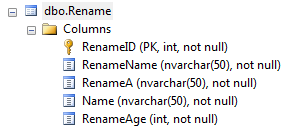
The table covers a few common cases in legacy databases. By default, the generated properties look like this (all code on this page is simplified to show only the result):
C#:
public System.Int32 RenameID { get; set; }

public System.String RenameName { get; set; }

public System.String RenameA { get; set; }

public System.String Name { get; set; }

public System.Int32 RenameAge { get; set; }
Visual Basic:
Public Property RenameID() As System.Int32
End Property

Public Property RenameName() As System.String
End Property

Public Property RenameA() As System.String
End Property

Public Property Name() As System.String
End Property

Public Property RenameAge() As System.Int32
End Property
The names are the same as the columns. The CSLA templates give you three ways to override a property or class name.
Method 1: The KeywordRenameAlias map
For renaming a few columns, this is the quickest and easiest method, although renaming many columns this way can be a lot of work.
-
In the CSLA templates folder, open the
Commonfolder.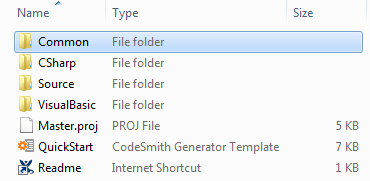
-
Double-click the
KeywordRenameAliasmap file. It opens in the Map Editor.
-
Add an entry for each name to change. The map already has a few entries. In this example, add
RenameAgewith the valueAge, andRenameAwith the valueLocation.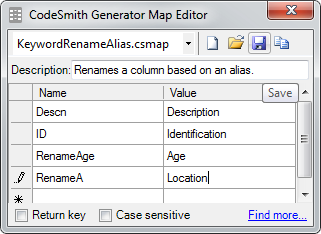
-
Click Save.
-
Regenerate your solution.
Note
The map applies to everything the templates generate, in every project. To rename for one project only, use a different method, or use a copy of the templates for that project.
The generated code uses the new names:
C#:
public System.Int32 RenameID { get; set; }

public System.String RenameName { get; set; }

public System.String Location { get; set; }

public System.String Name { get; set; }

public System.Int32 Age { get; set; }
Visual Basic:
Public Property RenameID() As System.Int32
End Property

Public Property RenameName() As System.String
End Property

Public Property Location() As System.String
End Property

Public Property Name() As System.String
End Property

Public Property Age() As System.Int32
End Property
The next sections start again from the map's default values.
Method 2: The CS_Alias extended property
This method works like Method 1, but the new name is stored in SQL Server as an extended property:
- In SQL Server Management Studio, right-click the column and select Properties.
- Select Extended Properties, and add an extended property named
CS_Aliaswith the new name as its value.
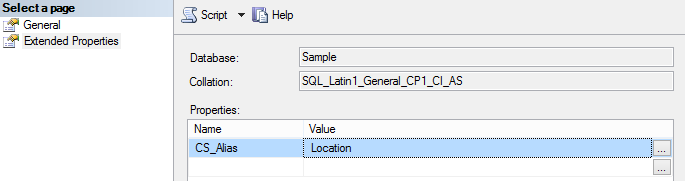
You can also add the extended property with SQL. This script was created with the Script button shown above:
EXEC sys.sp_addextendedproperty @name=N'CS_Alias', @value=N'Location' , @level0type=N'SCHEMA',@level0name=N'dbo', @level1type=N'TABLE',@level1name=N'Rename', @level2type=N'COLUMN',@level2name=N'RenameA'
GO
Method 3: Remove table prefixes
Use the CleanExpressions property to remove prefixes from the generated class and property names. CleanExpressions is a list of regular expressions: text in a table, view or column name that matches one of them is removed from the generated class and property names. By default, it's ^(sp|tbl|udf|vw)_, which removes the sp_, tbl_, udf_ and vw_ prefixes.
To change the expressions, set the CleanExpressions property in the property grid of the QuickStart or Entities template, then regenerate.
To change the default for every run, change it in the templates' source code. The source is included in the CSLA templates download from GitHub.
-
In the CSLA templates folder, open
Source\CSLA.sln. -
In the
Generator.CSLAproject, openCodeTemplates\CSLABaseTemplate.cs, and change the expression in theDefaultValueattribute of theCleanExpressionsproperty:[DefaultValue("^(sp|tbl|udf|vw)_")] public StringCollection CleanExpressions { -
Open
CodeTemplates\QuickStartCodeTemplate.cs, and change the same expression in the constructor:CleanExpressions = new StringCollection(new[] { "^(sp|tbl|udf|vw)_" }); -
Rebuild the solution.