
The QuickStart
Watch the QuickStart video on YouTube.
A working project in seconds. Think about the time it normally takes to get a project up and running: creating the solution, adding the projects, organizing your code. PLINQO makes it as easy as selecting a database.
As always with CodeSmith Generator, you're in control: change any of the QuickStart properties to generate the solution you want. Only the SourceDatabase property is required.
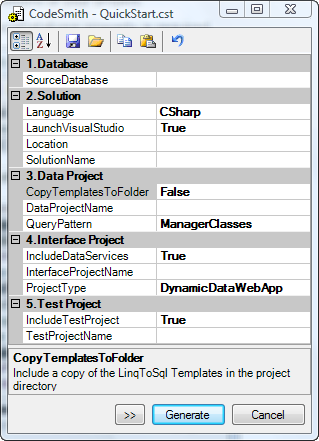
Click Generate, and PLINQO creates the solution and opens it for you. Then explore PLINQO's features in the Dynamic Data web project, write tests, or start building your application.
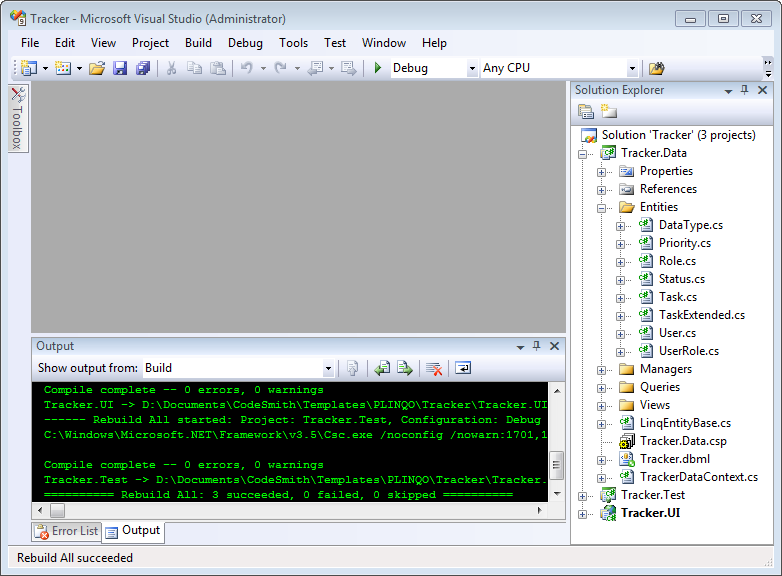
The solution includes a configured Generator project file (.csp), so regenerating is easy.
Organized, structured code
LINQ to SQL doesn't put much thought into what happens when the database changes or you need to customize the code: you write your own classes. PLINQO treats the generated code as the foundation of your solution, not the whole of it, and puts a lot of thought into project structure and file organization, which matters more as a project grows. PLINQO creates partial classes, with two files for each entity, manager and query extension: one file is actively generated, and the other is yours for customizing and extending.