
Skip to content
CodeSmith Tools
  • GeneratorTemplate-driven code generation for any language
    Exceptionless ↗Real-time error, feature & log reporting
    FrameworksPLINQO, CSLA, .netTiers, NHibernate templates
    Online StoreLicenses, upgrades & Premier Support
  • Pricing
  • Downloads
  • Docs
  • About UsThe team behind CodeSmith
    Our CustomersWho builds with CodeSmith
    Contact UsSales & support
  • Log in
  • Free trial
Log in Free trial
/
  • Documentation home
  • CodeSmith Generator
    • Getting started
      • Welcome
      • System requirements
      • Installing and upgrading
        • Installing CodeSmith Generator
          • Changing CodeSmith Generator
        • Uninstalling CodeSmith Generator
        • Upgrading templates
        • Upgrading property sets
      • Editions
      • Activation
      • Activation (5.x)
    • Tutorials
      • Generate code from a template
        • Launch Template Explorer
        • Open a template
        • Set properties
        • Generate code
        • Inspect the template
        • Where to go from here
      • Writing your first template
        • Spot the need
        • Create the template
        • Start with the result
        • Add static content
        • Make the content dynamic
        • Add template properties
        • Use properties in the template
        • Generate code
      • Template with database metadata
        • The scenario: a stored procedure that returns JSON
        • The desired SQL statements
        • Create the template
        • Set up enumerated properties
        • Set up a SQL property
        • Write the database code
        • Test the final result
    • Using CodeSmith Generator
      • Visual Studio Integration
      • Using Template Explorer
        • Managing the Folder Tree
        • Executing Templates
      • Using the Template Editor
        • Template Editor User Interface
          • Template Documents
          • The Properties Window
          • The Error Window
        • Template Editor Features
          • Statement Completion
          • Code Snippets
          • Documentation Comment Editing
          • Template Navigation
          • Find and Replace
          • Incremental Search
          • Bracket Highlighting
          • Outlining
          • Line Modification Markers
          • Tab Groups and Split Windows
          • Themes and Syntax Highlighting
          • Keyboard Shortcuts
        • Building, Running, and Compiling Templates
        • Customizing CodeSmith Generator
      • Using Schema Explorer
        • Managing Extended Properties
      • Using the Map Editor
        • Developing using a Generator Map
      • Using CodeSmith Generator Projects
        • Manage Outputs
          • Project Options
        • Using a Generator Project inside Visual Studio
        • Using Generator Project from Windows Explorer
        • Using a Generator Project from Command-Line
        • Using a Generator Project from MSBuild
        • Anatomy of a Project File
      • Using the Console Application
        • Incorporating Generator into Your Build Process
        • Console Application Usage
      • Using ActiveSnippets
        • ActiveSnippet Configuration
    • Writing templates
      • Basic template syntax
        • The CodeTemplate directive
        • Including comments
        • Declaring and using properties
          • Property directive
          • Declaring an enumerated property
          • Property validation
        • Escaping ASP.NET tags
        • The CodeSmith Generator objects
          • The CodeTemplate object
            • Overriding the GetFileName method
            • Overriding the Render method
            • Template events
            • The Response property
          • The Progress object
          • The CodeTemplateInfo object
      • Advanced template syntax
        • Code-behind model
        • Referencing assemblies
        • Importing namespaces
        • Including external files
        • Sharing common code
        • Debugging templates
          • Outputting trace and debug information
          • Viewing the compiled template source code
        • Using master templates
        • Writing to multiple outputs
      • Driving templates with metadata
        • Using .NET types
        • Using SchemaExplorer
          • The SchemaExplorer object model
          • Choosing objects
          • Sorting collections
          • Using extended properties
        • XML support
          • XML property examples
        • Custom metadata sources
          • Adding designer support
          • Adding property set support
        • Generating from source code
    • Advanced topics
      • Merge strategies
        • InsertRegion
        • PreserveRegions
        • InsertClass
        • Defining your own
      • Active vs. passive generation
      • Auto-executing SQL scripts
      • Template caching
      • Version control support
      • CodeSmith.BaseTemplates
        • OutputFileCodeTemplate
        • SqlCodeTemplate
        • StringUtil
        • ScriptUtility
      • CodeSmith.CustomProperties
        • FileNameEditor
        • StringCollection
      • Building a custom UITypeEditor
      • DataDirectory for connection strings
      • Troubleshooting schema providers
      • Building a custom schema provider
        • Creating
        • Building
        • Debugging
        • Deploying
    • Reference
      • FAQ
      • Tips and tricks
      • Samples
      • Premier Support
      • Software license
      • Copyrights and trademarks
    • Generator API
      • Using the Generator SDK
  • Frameworks
    • PLINQO for LINQ to SQL
      • Getting started
      • Features
      • Feature tour
        • Project features
          • The QuickStart
          • Customization and refactoring
          • Data Services and WCF
        • Data access features
          • Entity enhancements
          • Enum generation
          • Many-to-many relationships
          • Query extensions
        • Business logic features
          • Auditing
          • Using the rules engine
            • Rules example code
        • Performance features
          • Caching
          • Future queries
          • Performance improvements
      • Using the templates
        • DBML template
        • Entities template
        • Managers template
        • Query extensions template
        • QuickStart template
      • Download
    • PLINQO for Entity Framework
      • Getting started
      • Key features
      • Download
    • PLINQO for NHibernate
      • Getting started
      • Key features
      • Templates
      • Download
    • CSLA templates
      • Main features
      • Installing and upgrading
        • Downloading the CSLA templates
        • Upgrading the CSLA templates
      • Tutorials
        • Getting started
          • Using the QuickStart template
          • Inspecting the generated solution
          • Configuring business object types
          • Generating from views and stored procedures
          • Where to go from here
      • Using the templates
        • Entities template
        • QuickStart template
      • Advanced topics
        • Renaming classes and properties
        • Using partial methods
        • Extending stored procedures
        • Exploring the sample applications
        • Using extended properties
  • Archive (PDF)
Docs / CodeSmith Generator / Using CodeSmith Generator / Using the Template Editor / Template Editor Features /

Line Modification Markers

The Template Editor marks the lines you've changed during the current session in the left margin:

  • Yellow: changed lines that aren't saved yet.
  • Green: changed lines that have been saved. When you save the file, yellow markers turn green.
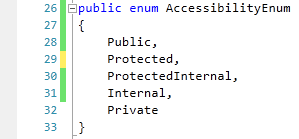
Code with green markers on saved lines and yellow markers on unsaved lines

PreviousOutlining NextTab Groups and Split Windows
CodeSmith Tools

The best developer tools to get your job done faster and avoid repetitive work.

Products

  • Generator
  • Exceptionless
  • Frameworks
  • Online Store

Resources

  • Downloads
  • Documentation
  • Tutorials
  • Support

Account

  • My account
  • My orders
  • Renew support
  • Upgrade

Company

  • About us
  • Customers
  • Testimonials
  • Contact
© CodeSmith Tools, LLC. All rights reserved. · Privacy