
Extending stored procedures
This page shows you how to keep your custom stored procedure logic when you regenerate.
By default, the CSLA templates don't run the stored procedures they generate, but they can: set the AutoExecuteStoredProcedures property of the Entities template to True. Then, when your database changes, your stored procedures are updated too.
That's great until you need custom logic in a stored procedure. So the generated scripts include logic that stops a stored procedure from being overwritten or dropped once you mark it as customized, whether the script runs automatically (AutoExecuteStoredProcedures is True) or you run it yourself.
Example
This example customizes a stored procedure to get the same result as the Using partial methods example. Here's the generated script for the CSLA_Calendar_Select stored procedure:
SET NUMERIC_ROUNDABORT OFF
GO
SET ANSI_PADDING, ANSI_WARNINGS, CONCAT_NULL_YIELDS_NULL, ARITHABORT, QUOTED_IDENTIFIER, ANSI_NULLS ON
GO
IF EXISTS (SELECT * FROM tempdb..sysobjects WHERE id=OBJECT_ID('tempdb..#tmpErrors')) DROP TABLE #tmpErrors
GO
CREATE TABLE #tmpErrors (Error int)
GO
SET XACT_ABORT ON
GO
SET TRANSACTION ISOLATION LEVEL SERIALIZABLE
GO
BEGIN TRANSACTION
GO
PRINT N'Dropping CSLA_Calendar_Select'
GO
IF EXISTS(SELECT 1 FROM fn_listextendedproperty (NULL, 'SCHEMA', 'dbo', 'PROCEDURE','CSLA_Calendar_Select', default, default) WHERE name = 'CustomProcedure' and value = '1')
BEGIN
    RAISERROR ('The procedure CSLA_Calendar_Select has an Extended Property "CustomProcedure" which means is has been customized. Please review and remove the property if you wish to drop the procedure.',16,1)
    INSERT INTO #tmpErrors (Error) SELECT 1
END
GO

IF OBJECT_ID(N'CSLA_Calendar_Select') IS NOT NULL
    DROP PROCEDURE CSLA_Calendar_Select

GO
IF @@ERROR!=0 AND @@TRANCOUNT>0 ROLLBACK TRANSACTION
GO

IF @@TRANCOUNT=0 BEGIN INSERT INTO #tmpErrors (Error) SELECT 1 BEGIN TRANSACTION END
GO

IF EXISTS (SELECT * FROM #tmpErrors) ROLLBACK TRANSACTION
GO

IF @@TRANCOUNT>0 BEGIN
PRINT 'The stored procedure drop has succeeded'
COMMIT TRANSACTION
END
ELSE PRINT 'The stored procedure drop has failed'
GO

DROP TABLE #tmpErrors
GO

--region [dbo].[CSLA_Calendar_Select]

------------------------------------------------------------------------------------------------------------------------
-- Procedure Name: [dbo].[CSLA_Calendar_Select]
------------------------------------------------------------------------------------------------------------------------

SET NUMERIC_ROUNDABORT OFF
GO
SET ANSI_PADDING, ANSI_WARNINGS, CONCAT_NULL_YIELDS_NULL, ARITHABORT, QUOTED_IDENTIFIER, ANSI_NULLS ON
GO
IF EXISTS (SELECT * FROM tempdb..sysobjects WHERE id=OBJECT_ID('tempdb..#tmpErrors')) DROP TABLE #tmpErrors
GO
CREATE TABLE #tmpErrors (Error int)
GO
SET XACT_ABORT ON
GO
SET TRANSACTION ISOLATION LEVEL SERIALIZABLE
GO
BEGIN TRANSACTION
GO

PRINT N'Creating [dbo].[CSLA_Calendar_Select]'
GO

IF EXISTS(SELECT 1 FROM fn_listextendedproperty (NULL, 'SCHEMA', 'dbo', 'PROCEDURE','CSLA_Calendar_Select', default, default) WHERE name = 'CustomProcedure' and value = '1')
    BEGIN
        RAISERROR ('The procedure [dbo].[CSLA_Calendar_Select] has an Extended Property "CustomProcedure" which means is has been customized. Please review and remove the property if you wish to create the stored procedure.',16,1)
        INSERT INTO #tmpErrors (Error) SELECT 1
    END
GO

CREATE PROCEDURE [dbo].[CSLA_Calendar_Select]
    @p_ID nvarchar(50) = NULL,
    @p_CalendarName nvarchar(50) = NULL,
    @p_Name nvarchar(50) = NULL,
    @p_EventStart datetime = NULL,
    @p_EventEnd datetime = NULL,
    @p_Resource nvarchar(150) = NULL
AS

SET TRANSACTION ISOLATION LEVEL READ COMMITTED

SELECT
    [ID],
    [CalendarName],
    [Name],
    [EventStart],
    [EventEnd],
    [Resource]
FROM
    [dbo].[Calendar]
WHERE
    ([ID] = @p_ID OR @p_ID IS NULL)
    AND ([CalendarName] = @p_CalendarName OR @p_CalendarName IS NULL)
    AND ([Name] = @p_Name OR @p_Name IS NULL)
    AND ([EventStart] = @p_EventStart OR @p_EventStart IS NULL)
    AND ([EventEnd] = @p_EventEnd OR @p_EventEnd IS NULL)
    AND ([Resource] = @p_Resource OR @p_Resource IS NULL)

GO
IF @@ERROR!=0 AND @@TRANCOUNT>0 ROLLBACK TRANSACTION
GO

IF @@TRANCOUNT=0 BEGIN INSERT INTO #tmpErrors (Error) SELECT 1 BEGIN TRANSACTION END
GO

IF EXISTS (SELECT * FROM #tmpErrors) ROLLBACK TRANSACTION
GO
IF @@TRANCOUNT>0 BEGIN
PRINT 'Stored procedure creation succeeded.'
COMMIT TRANSACTION
END
ELSE PRINT 'Stored procedure creation failed.'
GO
DROP TABLE #tmpErrors
GO

--endregion
Run the script in SQL Server Management Studio. The output shows that the stored procedure was dropped and created again:
Dropping CSLA_Calendar_Select
The stored procedure drop has succeeded
Creating [dbo].[CSLA_Calendar_Select]
Stored procedure creation succeeded.
Now modify the stored procedure to return the same results as the partial methods example. The last line of the WHERE clause is new:
ALTER PROCEDURE [dbo].[CSLA_Calendar_Select]
    @p_ID nvarchar(50) = NULL,
    @p_CalendarName nvarchar(50) = NULL,
    @p_Name nvarchar(50) = NULL,
    @p_EventStart datetime = NULL,
    @p_EventEnd datetime = NULL,
    @p_Resource nvarchar(150) = NULL
AS

SET TRANSACTION ISOLATION LEVEL READ COMMITTED

SELECT
    [ID],
    [CalendarName],
    [Name],
    [EventStart],
    [EventEnd],
    [Resource]
FROM
    [dbo].[Calendar]
WHERE
    ([ID] = @p_ID OR @p_ID IS NULL)
    AND ([CalendarName] = @p_CalendarName OR @p_CalendarName IS NULL)
    AND ([Name] = @p_Name OR @p_Name IS NULL)
    AND ([EventStart] = @p_EventStart OR @p_EventStart IS NULL)
    AND ([EventEnd] = @p_EventEnd OR @p_EventEnd IS NULL)
    AND ([Resource] = @p_Resource OR @p_Resource IS NULL)
    AND [EventStart] >= CONVERT(varchar,DATEADD(MONTH,DATEDIFF(MONTH,0,GETDATE()),0),101)
Mark the stored procedure as custom
Because you changed the stored procedure, mark it as a custom stored procedure. Otherwise, you have to make your change again every time you regenerate, or drop and recreate, the stored procedure.
- In SQL Server Management Studio, right-click the stored procedure and select Properties.
- Select Extended Properties.
- Add an extended property named
CustomProcedurewith the value1.
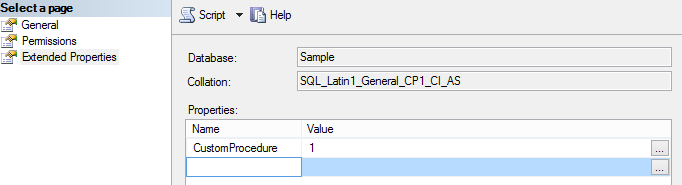
You can also add the extended property with this script:
EXEC sys.sp_addextendedproperty @name=N'CustomProcedure', @value=N'1' , @level0type=N'SCHEMA',@level0name=N'dbo', @level1type=N'PROCEDURE',@level1name=N'CSLA_Calendar_Select'
GO
Now, when you run the generated script that drops and creates the stored procedure, it stops with an error, and your changes are preserved:
Dropping CSLA_Calendar_Select
Msg 50000, Level 16, State 1, Line 3
The procedure CSLA_Calendar_Select has an Extended Property "CustomProcedure" which means is has been customized. Please review and remove the property if you wish to drop the procedure.

(1 row(s) affected)
The stored procedure drop has failed
Creating [dbo].[CSLA_Calendar_Select]
Msg 50000, Level 16, State 1, Line 4
The procedure [dbo].[CSLA_Calendar_Select] has an Extended Property "CustomProcedure" which means is has been customized. Please review and remove the property if you wish to create the stored procedure.

(1 row(s) affected)
Msg 2714, Level 16, State 3, Procedure CSLA_Calendar_Select, Line 13
There is already an object named 'CSLA_Calendar_Select' in the database.

(1 row(s) affected)
Stored procedure creation failed.