
Find and Replace
The Find and Replace window lets you quickly find and replace text in a template. To open it, press Ctrl+F or Ctrl+H.
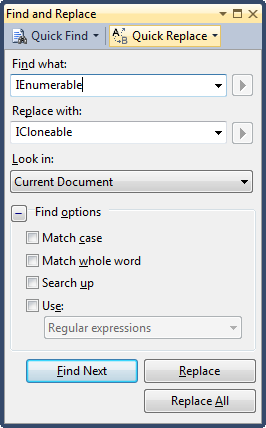
Options
| Option | What it does |
|---|---|
| Find what | The text to find. |
| Replace with | The text to replace it with. |
| Look in | Where to search. To search only the current document, select Current Document. |
| Match case | Matches only text with the same case. Otherwise, case is ignored. |
| Match whole word | Matches only whole words. Otherwise, text also matches inside words. |
| Search up | Searches from the cursor to the top of the file. Otherwise, the search goes from the cursor to the end of the file. |
| Use | Searches with regular expressions or wildcards. |
| Button | What it does |
|---|---|
| Find Next | Finds the next match in the file. |
| Replace | Replaces the next match in the file. |
| Replace All | Replaces all matches in the file. |
Regular expressions
To search with regular expressions, select the Use check box and then Regular Expressions. You can use this syntax:
| Expression | Matches |
|---|---|
. |
Any single character |
* |
Zero or more |
+ |
One or more |
^ |
Beginning of line |
$ |
End of line |
\b |
Word boundary |
\s |
White space |
\n |
Line break |
[] |
Any one character in the set |
[^] |
Any one character not in the set |
| |
Or |
\ |
Escape special character |
Replacing with a regular expression
You can use captured groups in the replacement text. For example, to remove the Get prefix from method names that start with Get and end with Result, such as GetApplicationResult:
- Select the Use check box and then Regular Expressions.
- In Find what, enter
Get(\w+)Result. This captures the letters betweenGetandResult. - In Replace with, enter
$1Result. - Click Replace All.
Every match is updated. For example, GetApplicationResult becomes ApplicationResult.
Wildcards
To search with wildcards, select the Use check box and then Wildcards. You can use this syntax:
| Wildcard | Matches |
|---|---|
* |
Zero or more of any character |
? |
Any one character |
# |
Any single digit |
[] |
Any one character in the set |
[^] |
Any one character not in the set |