
Adding designer support
If your custom metadata type needs more than the simple text box the property grid provides, you need to add designer support. Otherwise, users have no way to enter values for properties of that type. To add designer support, build an editor for your type or use an existing one. An editor is a class that derives from the .NET System.Drawing.Design.UITypeEditor class.
Example
The CustomPropertiesSample project contains the source code for several CodeSmith Generator editors. You'll find it in your extracted samples folder: Documents\CodeSmith Generator\Samples\<version>\Projects\CSharp\CustomPropertiesSample.
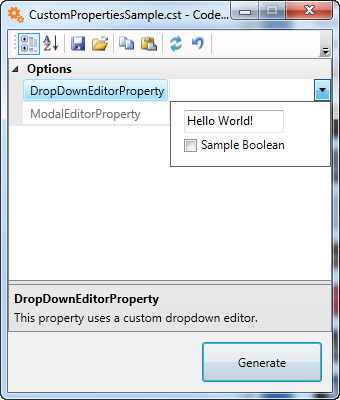
In that sample, DropDownEditorProperty is a class that combines a string and a Boolean value into a single piece of metadata. To edit it, the sample provides DropDownEditorPropertyEditor, which derives from UITypeEditor. An Editor attribute on DropDownEditorProperty tells Generator to use that editor in the property grid:
[Editor(typeof(CodeSmith.Samples.DropDownEditorPropertyEditor), typeof(System.Drawing.Design.UITypeEditor))]
public class DropDownEditorProperty
In a template, you use the type like any other. Remember to reference its assembly, because Generator doesn't know about the type otherwise:
<%@ Property Name="DropDownEditorProperty" Type="CodeSmith.Samples.DropDownEditorProperty" Category="Options" Description="This property uses a custom dropdown editor." %>
<%@ Assembly Name="CodeSmith.Samples" %>
When the user edits DropDownEditorProperty in the property grid, Generator shows the custom editor:
For a step-by-step walkthrough, see Building a custom UITypeEditor.
Predefined UITypeEditors
These editors ship with Generator:
| Editor | Assembly | Description |
|---|---|---|
CodeSmith.Engine.CodeFileParserPicker |
CodeSmith.Engine |
Browse for a C# or Visual Basic class file. |
CodeSmith.Engine.XmlPropertyFilePicker |
CodeSmith.Engine |
For a class that supports XML serialization: lets the user pick an XML file and deserializes it into the class. |
CodeSmith.Engine.XmlSchemaFilePicker |
CodeSmith.Engine |
Browse for an XSD schema. |
CodeSmith.CustomProperties.AssemblyFilePicker |
CodeSmith.CustomProperties |
Browse for an assembly. |
CodeSmith.CustomProperties.FileNameEditor |
CodeSmith.CustomProperties |
Browse for a file. |
CodeSmith.CustomProperties.NameValueCollectionEditor |
CodeSmith.CustomProperties |
Edit a NameValueCollection. Marked obsolete. |
CodeSmith.CustomProperties.StringCollectionEditor |
CodeSmith.CustomProperties |
Edit a string collection. Marked obsolete. |
CodeSmith.CustomProperties.XmlSerializedFilePicker |
CodeSmith.CustomProperties |
Browse for an XML file. |
For the editors in CodeSmith.CustomProperties, add this Assembly directive to your template:
<%@ Assembly Name="CodeSmith.CustomProperties" %>
To use an editor with a property, name it in the Editor attribute of the Property directive.
Note
.NET also includes many built-in UITypeEditors, such as System.Windows.Forms.Design.FileNameEditor and System.Windows.Forms.Design.FolderNameEditor.