
FileNameEditor
The FileNameEditor class lets users pick a file name with a standard Open or Save dialog from the CodeSmith Generator property grid. To use it, reference the CodeSmith.CustomProperties assembly in your template. Importing the namespace as well keeps the code shorter:
<%@ Assembly Name="CodeSmith.CustomProperties" %>
<%@ Import Namespace="CodeSmith.CustomProperties" %>
Then define a string property in a script block, and apply an Editor attribute that names FileNameEditor:
<script runat="template">
private string _userFileName = @"c:\temp\test.txt";
[Editor(typeof(FileNameEditor), typeof(System.Drawing.Design.UITypeEditor)),
Category("Custom"), Description("User selected file.")]
public string UserFileName
{
      get {return _userFileName;}
      set {_userFileName= value;}
}
</script>
When the user runs the template, the property shows a builder (…) button in the property grid:
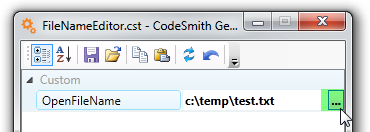
Clicking the button opens a file dialog. Without a FileDialog attribute, it's a Save dialog titled "Select" followed by the property name (here, "Select UserFileName").
Customizing the file dialog
To customize the dialog, apply a FileDialog attribute to the property. For example, this property opens an Open dialog titled "Select Input File":
<script runat="template">
private string _openFileName = @"c:\temp\test.txt";
[Editor(typeof(FileNameEditor), typeof(System.Drawing.Design.UITypeEditor)),
FileDialog(FileDialogType.Open, Title="Select Input File"),
Category("Custom"), Description("User selected file.")]
public string OpenFileName
{
      get {return _openFileName;}
      set {_openFileName= value;}
}
</script>
The attribute's constructor takes the dialog type, and you can set these properties:
| Property | Meaning | Default |
|---|---|---|
DialogType |
FileDialogType.Save or FileDialogType.Open. Set it with the constructor argument. |
FileDialogType.Save |
Filter |
Filter string for file types. | All Files (*.*)|*.* |
Title |
Dialog title. | Select followed by the property name |
DefaultExtension |
Default file extension. | None |
CheckFileExists |
True to only allow existing files. |
The Windows dialog's default |
CheckPathExists |
True to only allow existing paths. |
The Windows dialog's default |
Picking a folder
To let the user pick a folder instead of a file, use the .NET FolderNameEditor class instead:
<%@ Assembly Name="System.Design" %>
<script runat="template">
private string _outputDirectory = @"c:\temp";
[Editor(typeof(System.Windows.Forms.Design.FolderNameEditor), typeof(System.Drawing.Design.UITypeEditor)),
Category("Custom"), Description("Output directory.")]
public string OutputDirectory
{
       get {return _outputDirectory;}
       set {_outputDirectory= value;}
}
</script>