
Setting up a DataDirectory for Generator Connection Strings
ADO.NET connection strings can contain the |DataDirectory| placeholder, which is replaced with a folder path when the connection opens. CodeSmith Generator sets this folder for you, so you can keep database files, such as SQL Server Express or LocalDB .mdf files, in one shared folder and refer to them without hard-coding a path.
For example, a SQL Server data source could use this connection string:
Data Source=(LocalDB)\MSSQLLocalDB;AttachDbFilename=|DataDirectory|\MyDatabase.mdf;Integrated Security=True
The default DataDirectory
By default, Generator's DataDirectory is the Data folder of the samples, in your Documents folder:
Documents\CodeSmith Generator\Samples\v8.5\Data
This folder also contains the PetShop sample database files.
Note
Generator only sets the DataDirectory if the folder exists, and if the DataDirectory hasn't already been set by the application that hosts Generator.
Changing the DataDirectory
-
Open the Options dialog and select the Engine page.
-
In the Paths category, select CodeSmithDataDirectory, then click the browse (…) button and choose a folder.
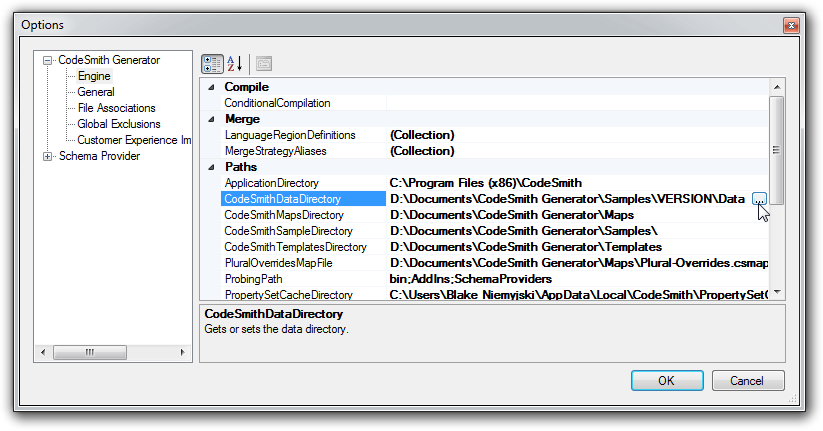
-
Click OK, then restart Generator. The new folder is used the next time Generator starts.